
 Data Analytics for the Project Manager
Project managers are used to living in the world of time, cost, and scope—but risk often sits in the background as something “owned” by someone else. In reality, schedule risk is central to whether your project succeeds or fails.
The good news is that Generative AI (GenAI) can help you see risks in your schedules more clearly and more quickly, without waiting for a separate risk function or a complex toolset.


This article walks through a practical, project‑manager‑friendly way to use GenAI to validate and improve schedules for Agile, hybrid, and traditional projects.
Why Project Managers Need to Think Like Risk Managers
Risk, at its simplest, is “bad things that happen” that push your project onto a negative trajectory—missed timelines, blown budgets, high defect rates, or failed business readiness.
Many project managers try to manage risk with issue and risk logs alone, but logs are not the same as risk management.

Risk management is meant to be comprehensive and proactive. It weaves into your project in an iterative, repeatable way, not as a one‑time exercise when things go wrong.
Even if you never name frameworks like PMBOK or NIST, the underlying idea is that risk management should be built into how you plan, execute, and monitor your work—not just tracked in a spreadsheet.
When a large percentage of projects still have serious problems or fail to meet expectations, there’s a clear signal: as project managers, we have gaps.
Risk management exists to close those gaps and push the success rate up.
What GenAI Can Really Do for Risk Management
GenAI is often discussed as a tool for drafting content, but in project work its potential goes far beyond that.
It can help you:
- Surface information and patterns from your charters, schedules, and business cases.
- Compare current plans against prior templates.
- Highlight potential risks and suggest mitigation ideas.
- Generate checklists and audit sheets that you can reuse.
The key is to keep your approach simple and grounded in your own project management knowledge. You still need to know what you’re asking for; GenAI amplifies your insight, it doesn’t replace it.
A Simple GenAI Risk Analysis Process
From a risk manager’s perspective, here’s a straightforward way project managers can use GenAI on their own projects.
First, gather your key documents: schedules, charters, business cases, and any relevant plans. Upload that material into your AI workspace and ask targeted questions about risk, quality, and completeness.
Then write a clear risk‑focused prompt that reflects what you care about—schedule gaps, missing phases, weak testing, underestimated migration, and so on.

GenAI will generate observations and potential risk points. Your job is to stay “human in the loop.” You read the output, validate whether it makes sense, and discard anything that looks invented or off‑base. From what remains, you form mitigation recommendations and feed them into your logs, reports, and conversations with stakeholders.
This process is simple enough that you can run it yourself, even if your PMO doesn’t have formal risk management in place or your project is considered too small for a dedicated risk manager.
Prompts, Templates, and the Importance of PM Knowledge
Most project managers are already writing prompts. You’ve probably noticed that if you don’t know your own discipline, you don’t get good answers.
Asking vague or unfocused questions produces vague results.
Templates can strengthen your prompts. If your organization has assets from prior projects—ERP or CRM schedules, finance project plans—you can upload those and ask GenAI to compare them to your current plan.
That helps surface differences and potential risk points, such as missing phases, weak decomposition, or underestimated work.
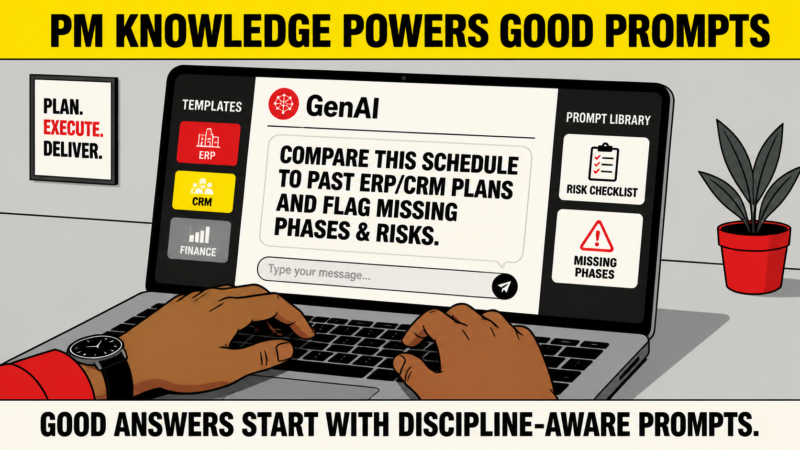
Over time, you can build a small prompt library: a collection of well‑tested prompts you reuse across projects.
That library becomes a reusable asset and can even be automated so you can re‑run the same risk lenses as your project evolves.
No Two Schedules Are the Same
Every project is different.
Agile, hybrid, and traditional schedules will look and behave differently, and you may have multiple schedule views for the same initiative: a high‑level Agile roadmap, detailed sprint plans, and a Gantt‑style plan for milestones and dependencies.

GenAI doesn’t require that all these schedules look identical. Instead, it helps you quickly check each view for signs of risk.
One critical pattern to watch for is the absence of an end‑to‑end view.
Many Agile projects in trouble have no 10,000‑foot schedule from start to finish, which means they can’t forecast timelines, costs, or defect management.
A simple prompt against your current artifacts can reveal that gap and nudge you to define a full project picture.
Common Schedule Risks GenAI Can Help You See
When you apply GenAI to your schedules, you’re looking for recurring patterns.
For example:
- Stories or requirements that haven’t been decomposed into tasks.
- Hidden dependencies across teams or systems.
- Underrepresented testing, data migration, or business readiness work.
- Blurry or missing “definition of done” in sprints.
In Agile environments, a frequent issue is handing stories directly to developers and letting specifications live in emails or ad‑hoc spreadsheets.
Without structured decomposition and documentation, you lose control and traceability, and that’s where risk grows quickly.
GenAI can read your backlog, sprint plan, and task lists and point out where decomposition is missing, where integrations are under‑specified, and where key phases are thin.
Decomposing Stories: A Practical Use Case
One simple, practical use of GenAI is to ask it about “story decomposition risks.” With that prompt, you can quickly generate a list of issues related to undecomposed stories and a backlog‑decomposition checklist.
That checklist becomes an audit tool you can apply across your backlog.
Instead of manually brainstorming all the things that might go wrong, you have a structured set of questions you can walk through and adapt to your context.
If your project doesn’t do this work and a risk manager comes in using AI, they will likely be using similar checklists and scoring your project against them. You can do that first, yourself.
Using GenAI on Sprint Plans and Hybrid Schedules
Sprint plans are another prime area for GenAI‑supported risk analysis. Ideally, Agile teams have a full set of sprints planned across the project.
When teams only plan one or two sprints at a time and say, “We’re planning as we go,” it creates uncertainty and makes it hard to see the endpoint, the cost, and the overall risk profile.
By exporting sprint plans (for example, from Azure DevOps or Jira), including task‑level detail with durations, start and finish dates, and SDLC phases, you can upload that file and prompt GenAI to identify sprint risks.
It may flag missing test coverage, weak readiness planning, or gaps in story‑to‑task decomposition.

Hybrid schedules benefit in the same way.
GenAI can scan your plan and show that hybrid projects still carry sprint‑level risks internally—testing, integration, migration, readiness—all of which need to be visible and managed in the schedule.
ADO, Jira, and MS Project: Combining Tools
Azure DevOps and Jira are strong for managing day‑to‑day work in Agile teams.
MS Project is strong for high‑level planning and forecasting: release roadmaps, major milestones, testing cycles, and migration windows.
Rather than choosing one, positive risk‑aware project management often uses both.
You can:
- Extend ADO or Jira to include task‑level data, effort, and dates for better traceability.
- Use MS Project to maintain the bigger picture: coordination across phases, windows for testing and migration, and overall timing.
GenAI can work with exports from both tools, helping you check for consistency and spot where one view hides work that the other reveals.
Audit Checklists and Prompt Libraries
When you run prompts like “identify sprint schedule risks” or “list risks in hybrid schedules,” GenAI can generate audit sheets with categorized questions and even score them.
These sheets can cover technical work, integration, data migration, readiness, and more.

Over time, you can turn those prompts and sheets into a small prompt library for your team.
That library:
- Saves time, because you don’t reinvent questions for each project.
- Brings consistency to how you look at risk.
- Can grow into a reusable asset across the organization.
The Real Barrier: Resistance to Change
The biggest challenge isn’t the technology; it’s mindset and habit. Project managers and integrators often arrive with strong preferences about how they “do Agile” or “do implementations,” even when they haven’t built risk management into their process.
There are also skill gaps. People may call themselves project managers without training or certification and still feel confident that they know how to handle risk.
GenAI won’t fix those attitudes, but it can give you clearer evidence of where gaps exist and how simple improvements could be made.
Becoming a Better Project Manager with GenAI
GenAI‑based risk analysis doesn’t have to be complex or intimidating.
Used in a simple way—uploading schedules, asking targeted questions, validating outputs—it can help you become your own risk manager, strengthen your schedules, and improve all aspects of your project.
Instead of relying solely on issue logs or hoping that problems surface early enough to fix, you can use GenAI to see risks sooner and act on them.
That’s the core promise: using GenAI not just to write content, but to become a better, more risk‑aware project manager.
CLICK HERE FOR MORE ARTICLES
Posted by mfriday on July 28, 2026
